DeploymentScaler
Location: iris/deployment_scaler/ ⧉
Language: Go
Role: Auto-scales deployments based on Prometheus metrics using HPA-style logic
DeploymentScaler monitors inference deployments and automatically adjusts replica counts based on real-time metrics (p95 latency, RPS) and health status. It uses a Kubernetes HPA-inspired algorithm with health-first guarantees and stabilization windows to prevent oscillation.
Architecture
DeploymentScaler
    │
    ├─► Syncer (periodic loop)
    │   └─ GET /inference/list from Gateway
    │       → sync to Redis (upsert changed, remove stale)
    │
    ├─► Manager (periodic loop)
    │   └─ Discover deployments without active scaler
    │       → spawn Scaler goroutine per deployment
    │       → heartbeat scaler ID in Redis (TTL-based leader election)
    │
    └─► Scaler (per deployment, heartbeat loop)
        ├─ Query Prometheus
        │   ├─ p95 latency: histogram_quantile(0.95, ...)
        │   └─ RPS per replica: rate(...) / healthy_count
        │
        ├─ Compute desired replica count
        │   ├─ Primary metric: min_replicas (health floor)
        │   └─ Secondary metric: HPA ratio (latency, RPS)
        │
        └─ POST /scale to Gateway
            ├─ replicas_to_add: new replicas needed
            └─ replica_ids_to_stop: oldest replicas to remove
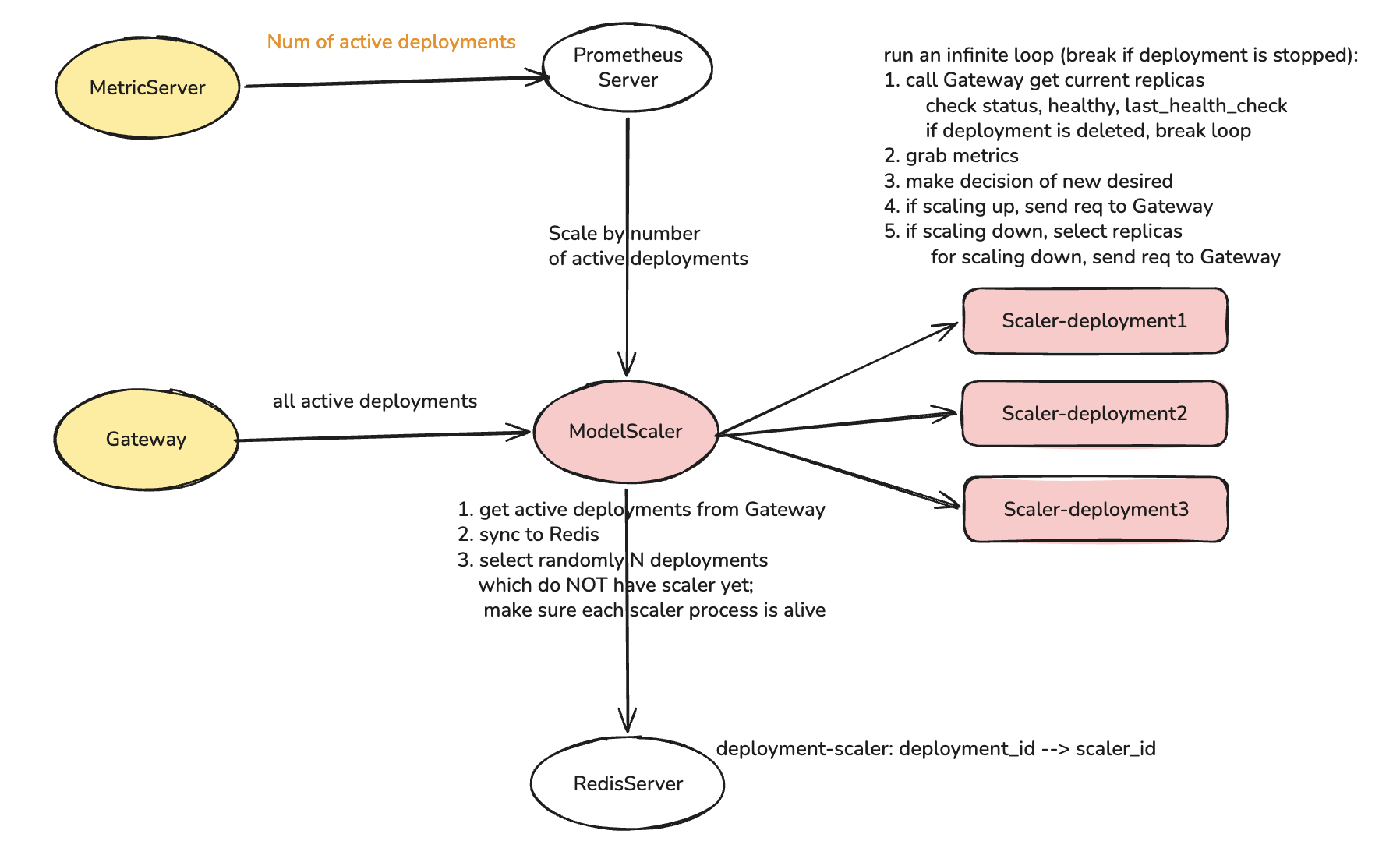
Three Concurrent Loops
1. Syncer
Fetches deployment list from Gateway (GET /api/v2/external/inference/list) and syncs to Redis. Runs every 30s. Upserts changed deployments and removes stale entries.
2. Manager
Scans Redis for deployments without active scalers and spawns Scaler goroutines. Runs every 5s (configurable via LYC_RECONCILE_INTERVAL). Uses TTL-based leader election in Redis (scaler heartbeats with 30s TTL). Multiple DeploymentScaler instances can run safely.
3. Per-Deployment Scaler
Executes scaling decisions for a single deployment every 5s (configurable via LYC_SCALER_HEARTBEAT_INTERVAL). Each tick: checks gate conditions, fetches replicas from Gateway, classifies replica health, computes desired count using HPA-style logic, applies downscale stabilization, and calls POST /api/v2/internal/inference/scale if changes needed.
Scaling Algorithm
Gate Checks
Skip scaling if deployment status not in ["running", "created"], within 120s cooldown since last scale action, or Prometheus unavailable.
Bootstrap
When current_replicas == 0 and min_replicas > 0, request min_replicas immediately for fast initial provisioning.
Replica Classification
| Type | Criteria | Behavior |
|---|---|---|
| Healthy | healthy == true, recent health check |
Counts toward capacity, can be scaled down |
| Warming | status == "pending" or recently created (< 1h) |
Excluded from metrics, protected from termination |
| Unhealthy | healthy == false, stale check, or failed status |
Scheduled for removal only when healthy_count > min_replicas |
Desired Replica Calculation
Primary (Health Floor): Start with desired = min_replicas to guarantee minimum capacity.
Secondary (HPA Ratio): If at least one healthy replica exists and targets configured:
- Compute latency_ratio = current_p95 / target_latency_p95_ms
- Compute rps_ratio = (rps_per_replica) / target_rps
- Use ratio = max(latency_ratio, rps_ratio) (most constrained metric wins)
- If abs(ratio - 1.0) > 0.1 (10% tolerance): scale up/down by multiplying healthy count by ratio
- Clamp to [min_replicas, max_replicas]
Replica Deficit: replicas_to_add = max(0, desired - healthy_count - warming_count)
Downscale Stabilization
Records desired count in sliding window (default 5 min). Only allows scale-down when window_max < current_healthy_count. Removes at most 1 replica per tick (oldest first) to prevent rapid oscillations.
Scale Action
Calls POST /api/v2/internal/inference/scale with replicas_to_add and replica_ids_to_stop. Records last_scale_at in Redis to start 120s cooldown.
Configuration
Environment Variables
| Variable | Default | Description |
|---|---|---|
| Prometheus | ||
LYC_PROMETHEUS_ADDR |
http://localhost:9090 |
Prometheus server URL |
LYC_PROMETHEUS_USERNAME |
(empty) | Basic auth username |
LYC_PROMETHEUS_PASSWORD |
(empty) | Basic auth password |
| Gateway | ||
API_BASE_URL |
required | Gateway API URL |
DEPLOYMENT_SCALER_SERVICE_TOKEN |
required | Bearer token for Gateway calls |
LYC_GATEWAY_TIMEOUT |
30s |
HTTP timeout for Gateway calls |
| Redis | ||
LYC_REDIS_ADDR |
localhost:6379 |
Redis server address |
LYC_REDIS_PASSWORD |
(empty) | Redis AUTH password |
| Scaling | ||
LYC_MAX_DEPLOYMENTS |
10 |
Max scalers per instance |
LYC_SCALER_HEARTBEAT_INTERVAL |
5s |
How often scaler makes decisions |
LYC_SCALER_ID_TTL |
30s |
Leader election TTL |
| Intervals | ||
LYC_SCRAPE_INTERVAL |
30s |
Syncer interval (fetch deployments) |
LYC_RECONCILE_INTERVAL |
5s |
Manager interval (spawn scalers) |
| Lifecycle | ||
LYC_ZERO_SCALE_THRESHOLD |
1h |
Idle time before scaling to zero |
LYC_LIFECYCLE_TICK_INTERVAL |
15s |
Lifecycle manager loop interval |
LYC_LIFECYCLE_MANAGER_ID_TTL |
60s |
Lifecycle manager leader election TTL |
LYC_LIFECYCLE_COOLDOWN |
60s |
Cooldown between lifecycle actions |
LYC_CRASHED_THRESHOLD |
1h |
Duration before marking unhealthy replicas as crashed |
LYC_HEALTH_CHECK_THRESHOLD |
1m |
Max age of health check before replica is stale |
| Server | ||
LYC_HTTP_ADDR |
:8082 |
HTTP listen address |
Constants (Hardcoded)
| Constant | Value | Purpose |
|---|---|---|
| Cooldown | 120s | Minimum time between scale actions |
| Health Grace Period | 1h | Age threshold for warming→unhealthy transition |
| HPA Tolerance | 0.1 (10%) | Ratio deviation needed to trigger scale |
| Scale Timeout | 10s | Context timeout for one scaling decision |
Operational Considerations
Tuning Scaling Behavior
Aggressive Scaling (fast response to load):
LYC_SCALER_HEARTBEAT_INTERVAL=3s    # More frequent decisions
LYC_GATEWAY_TIMEOUT=5s              # Faster failures
# Set lower target_latency_p95_ms in deployment config
Conservative Scaling (stable, avoid churn):
LYC_SCALER_HEARTBEAT_INTERVAL=30s   # Less frequent decisions
LYC_SCALER_ID_TTL=120s              # Longer leadership
# Set higher target_latency_p95_ms, use longer stabilisation_window
Debugging Scaling Issues
"Deployment not scaling up despite high latency":
- Check Prometheus metrics:
lyceum_inference_latency_millis{deployment_id="<id>"} - Check scaler heartbeat:
redis-cli GET scaler:<id>:id - Check cooldown:
redis-cli GET scaler:<id>:last_scale(should be >120s ago) - Check Gateway logs for
/scaleerrors
"Deployment scaling down too aggressively":
- Increase
stabilisation_windowin deployment config - Check HPA ratio calculations in scaler logs
- Verify target metrics are appropriate for workload
"Scaler not running for deployment":
- Check Manager logs for spawn errors
- Verify deployment in Redis:
redis-cli GET deployment:<id> - Check
MAX_DEPLOYMENTSlimit not hit