Iris Inference System - Overview
Iris is Lyceum's dedicated model inference service that enables users to deploy and auto-scale LLM inference workloads. It uses a queue-based, auto-scaling architecture designed for high availability and efficient resource utilization.
System Architecture (High Level)
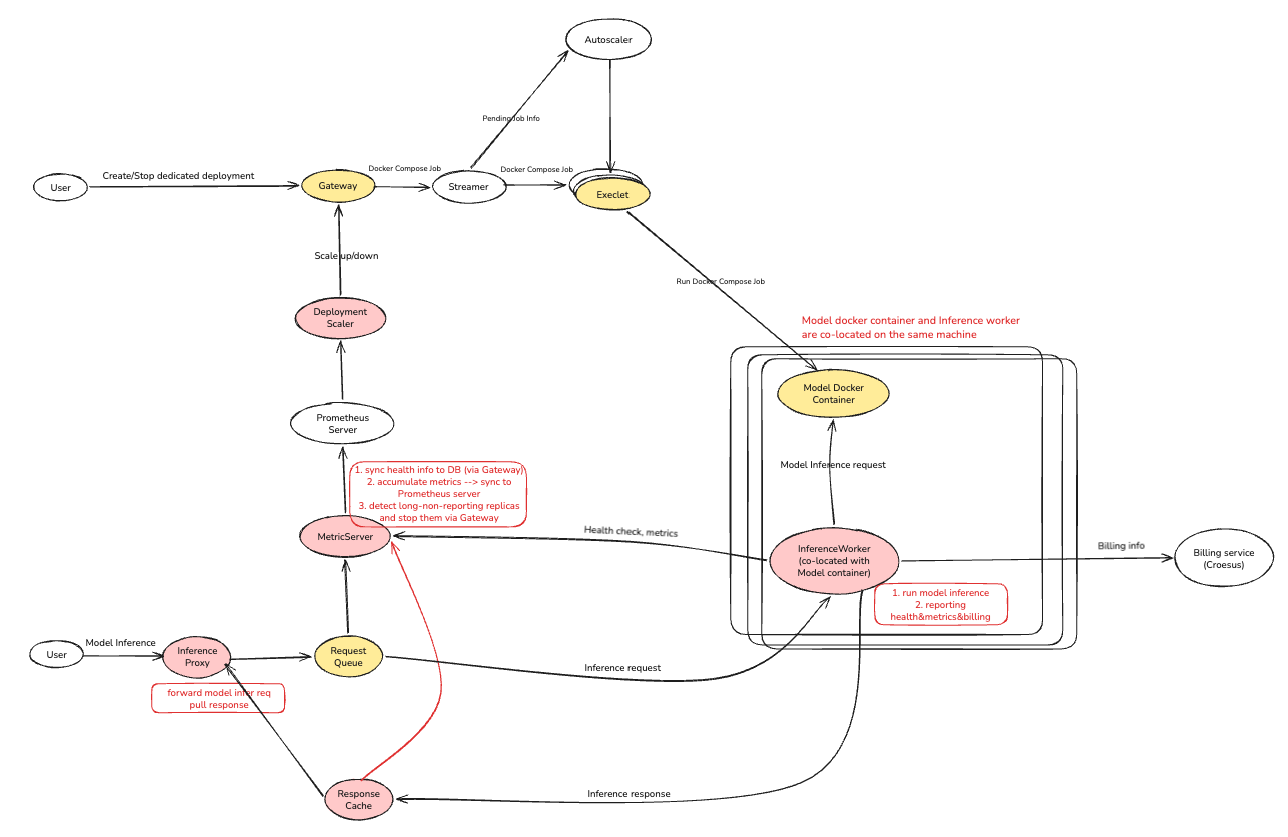
System Architecture (Data Flow)
                      User / CLI
                          │
                ┌─────────▼──────────┐
                │      Gateway       │  create / stop / get / list
                └──┬──────────────┬──┘
                   │              │
        job submit │              │ meta info
                   │              │
                   ▼              ▼
               Streamer        CloudSQL
                   │
                   │
          ┌────────┴────────┐
          │  Execlet Node   │  (one per replica)
          │  ┌───────────┐  │
          │  │   Model   │  │  e.g. vLLM on port 8000
          │  │ Container │  │
          │  └─────▲─────┘  │
          │        │ HTTP   │
          │  ┌─────┴──────┐ │
          │  │ Inference  │ │  sidecar
          │  │  Worker    │ │
          │  └──┬──────┬──┘ │
          └─────┼──────┼────┘
                │      │
        consume │      │ write response
                │      │
                ▼      ▼
            RabbitMQ   Redis
                ▲      │
                │      │
        publish │      │ poll / read
                │      │
                │      ▼
          ┌─────┴──────────────┐
          │  InferenceProxy    │  sync + async modes
          └────────────────────┘
                  ▲
                  │
              User / CLI


        ┌──────────────────────────┐
        │  InferenceWorker (each)  ├──► MetricServer ──────► Prometheus (Grafana)
        └──────────┬───────────────┘         │                    │
                   │ billing                 │            DeploymentScaler
                   │                         │                    │
                   │                  health │              scale │
                   ▼                         │                    │
                Croesus                      └──────►Gateway◄─────┘
Quick Start (OpenAI SDK)
Send inference requests using the standard OpenAI Python SDK:
from openai import OpenAI

client = OpenAI(
    api_key="lk_...",                                      # from API Keys page
    base_url="https://prod.iris.lyceum.technology/v1",     # Iris proxy, NOT api.lyceum.technology
)

resp = client.chat.completions.create(
    model="<deployment_id>",
    messages=[{"role": "user", "content": "Hello"}],
)
print(resp.choices[0].message.content)
| Environment | base_url |
|---|---|
| Development | https://devel.iris.lyceum.technology/v1 |
| Integration | https://integration.iris.lyceum.technology/v1 |
| Production | https://prod.iris.lyceum.technology/v1 |
No custom headers required — the model field doubles as the deployment ID, and the SDK sends the API key as Authorization: Bearer automatically.
Request Flow
Synchronous Mode (Default)
sequenceDiagram
    participant User
    participant InferenceProxy
    participant RabbitMQ
    participant InferenceWorker
    participant Model
    participant Redis

    User->>InferenceProxy: POST /v1/chat/completions<br/>(Authorization, model or X-Deployment-ID)
    InferenceProxy->>InferenceProxy: Validate auth (cache)
    InferenceProxy->>InferenceProxy: Check deployment health (cache)
    InferenceProxy->>RabbitMQ: Publish to infer_req.<deployment_id>
    InferenceProxy->>Redis: Poll infer_resp:<request_id>

    RabbitMQ->>InferenceWorker: Deliver message
    InferenceWorker->>Model: POST /v1/chat/completions
    Model-->>InferenceWorker: Response
    InferenceWorker->>Redis: Write infer_resp:<request_id>

    Redis-->>InferenceProxy: Result available
    InferenceProxy-->>User: 200 OK + result
Asynchronous Mode (X-Async: true)
sequenceDiagram
    participant User
    participant InferenceProxy
    participant RabbitMQ
    participant InferenceWorker
    participant Redis

    User->>InferenceProxy: POST /v1/chat/completions<br/>(X-Async: true)
    InferenceProxy->>Redis: Write infer_resp:<request_id> = "pending"
    InferenceProxy->>RabbitMQ: Publish to queue
    InferenceProxy-->>User: 202 Accepted<br/>{request_id}

    RabbitMQ->>InferenceWorker: Deliver message
    InferenceWorker->>InferenceWorker: Process request
    InferenceWorker->>Redis: Update infer_resp:<request_id> = result

    User->>InferenceProxy: GET /v1/chat/completions/{request_id}
    InferenceProxy->>Redis: Read infer_resp:<request_id>
    Redis-->>InferenceProxy: Result
    InferenceProxy-->>User: 200 OK + result
Components
Core Iris Components
| Component | Code | Deployment | Purpose |
|---|---|---|---|
| InferenceProxy | Goiris/inference_proxy/ |
Cloud Run service behind Global HTTPS Load Balancer | User-facing inference API; authenticates requests, validates deployments, publishes to RabbitMQ, and polls Redis for results (sync/async modes) |
| InferenceWorker | Pythoniris/inference_worker/ |
Docker container on each Execlet VM (sidecar in docker-compose) | Sidecar per replica; consumes from RabbitMQ, calls model container, writes results to Redis, reports metrics and billing data |
| MetricServer | Goiris/metric_server/ |
Cloud Run service | Telemetry broker; receives metrics from workers, tracks replica health, exposes Prometheus /prom endpoint |
| DeploymentScaler | Goiris/deployment_scaler/ |
Cloud Run service | Auto-scaler; monitors Prometheus metrics, computes desired replica count using HPA-style logic, calls Gateway to scale up/down |
Core Infrastructure Components
| Component | Code | Deployment | Purpose |
|---|---|---|---|
| Gateway | Python (FastAPI)/app/src/app/ |
systemd service | Central API orchestrator; manages deployment lifecycle, database records, and replica provisioning via Streamer; exposes Iris-specific endpoints (/inference/[create|stop|get|list|scale]) |
| lyceum-cli | Python (Typer)/app/src/lyceum-cli/ |
PyPI package (pip install lyceum-cli) |
Command-line interface; user-facing tool for managing deployments, submitting inference requests, and interacting with Gateway API |
| Streamer | Go/stream_execlet/cmd/streamer/ |
systemd service | Job scheduler; maintains queue of pending jobs and distributes them to available Execlet nodes based on hardware profile matching |
| Hydra | Go/infra/services/hydra-autoscaler/ |
systemd service | VM autoscaler; monitors Streamer's job queue and provisions VMs from cloud providers when jobs are pending |
| Execlet | Go/stream_execlet/cmd/execlet/ |
systemd service on each compute VM | VM daemon; maintains bidirectional gRPC connection to Streamer, executes docker-compose jobs, reports status back to Gateway via callbacks |
| Croesus | Go/croesus/ |
Cloud Run service | Billing service; receives token usage events from InferenceWorkers as CloudEvents and tracks usage for billing purposes |
Supporting Infrastructure Components
| Component | Code | Deployment | Purpose |
|---|---|---|---|
| RabbitMQ | Terraform/infra/terraform/_modules/gcp/rabbitmq/ |
GCP Compute Engine instances (VMs) with load balancer | Message broker; one queue per deployment. All replicas consume from same queue (competing consumers). Dead-letter queue (DLQ) for failed messages. |
| Redis | Terraform/infra/terraform/_modules/gcp/redis/ |
GCP Memorystore (managed Redis instance) | State & caching; response bus, deployment metadata cache, auth cache, replica health state |
| Prometheus | Terraform/infra/terraform/grafana/ |
Grafana Cloud (managed Prometheus service) | Metrics & monitoring; scrapes /prom from MetricServer; used by DeploymentScaler for auto-scaling decisions (p95 latency, RPS) |
| CloudSQL | Terraform/infra/terraform/_modules/gcp/cloud_sql/ |
GCP Cloud SQL (managed PostgreSQL service) | Database; dedicated_deployments and deployment_replicas tables; source of truth for deployment state |
Key Design Principles
1. Queue-Based Request Distribution
All replicas of a deployment share a single RabbitMQ queue (infer_req.<deployment_id>), acting as competing consumers. Messages are distributed naturally by RabbitMQ based on worker availability and prefetch limits.
Benefits: - No external load balancer needed - Natural backpressure and flow control - Failed messages automatically retry via DLQ
2. Sidecar Pattern
InferenceWorker runs alongside the model container in the same docker-compose environment, communicating over the internal network (http://model:8000).
Benefits: - No network latency between worker and model - Simplified deployment (single compose file) - Health monitoring co-located with model
3. Redis Response Bus
InferenceProxy and InferenceWorker are fully decoupled. The proxy publishes requests to RabbitMQ and polls Redis for results. Workers write results to Redis without knowing which proxy instance is waiting.
Benefits: - Proxy doesn't hold connections to VMs - Workers can restart without affecting proxy - Supports both sync and async request modes
4. Multi-Tier Caching
InferenceProxy caches at multiple levels to minimize database and external API calls: - Auth cache (JWT/API key validation) - Deployment metadata cache (permanent) - Replica health cache (TTL-based: 10s when count=0, 10min when count>0)
Benefits: - Faster request processing - Reduced load on Gateway and Supabase - TTL-based staleness for health checks
5. Stateless Auto-Scaling
DeploymentScaler derives all decisions from current Prometheus metrics and Gateway state. It uses Redis only for coordination (leader election via TTL keys), not for persistent state.
Benefits: - Resilient to process restarts - Multiple scaler instances can run safely - No state synchronization issues
Deployment Lifecycle
Creation
- User calls
POST /api/v2/external/inference/createvia Gateway (or useslyceum-cli) - Gateway creates
dedicated_deploymentsrecord in CloudSQL - Gateway seeds Redis cache with deployment metadata
- Gateway renders docker-compose file (model + worker sidecar) for each
min_replicas - Gateway submits jobs to Streamer
- Streamer assigns jobs to Execlet nodes based on hardware profile
- Execlet runs
docker-compose up(vLLM + InferenceWorker) - Execlet reports progress back to Gateway via callbacks
- InferenceWorker starts consuming from RabbitMQ queue
- InferenceWorker reports health to MetricServer
- DeploymentScaler discovers deployment and begins monitoring
Scaling
- DeploymentScaler queries Prometheus for p95 latency and RPS metrics
- DeploymentScaler computes HPA ratio:
max(currentP95/targetP95, currentRPS/targetRPS) - DeploymentScaler calculates desired replica count (clamped to
[min_replicas, max_replicas]) - DeploymentScaler calls Gateway
POST /api/v2/internal/inference/scale - Gateway creates new jobs (scale up) or aborts replicas (scale down)
- Process repeats with 120s cooldown between actions
Deletion
- User calls
DELETE /api/v2/external/inference/stopvia Gateway - Gateway marks deployment as "stopped" in database
- Gateway deletes Redis cache keys
- Gateway aborts all replica jobs via Streamer
- Execlet runs
docker-compose downon each node - MetricServer evicts stale instances after eviction threshold
Monitoring & Observability
Metrics (Prometheus)
All metrics are exposed by MetricServer at the /prom endpoint.
| Metric | Type | Purpose |
|---|---|---|
lyceum_inference_latency_millis |
Histogram | Request latency distribution; used for p95 calculations |
lyceum_inference_requests_total |
Counter | Total requests processed; used for RPS calculations |
lyceum_inference_instance_health |
Gauge | Per-replica health status (1=healthy, 0=unhealthy) |
lyceum_inference_instance_last_report_age_seconds |
Gauge | Time since last health report from replica |
Health Tracking
- InferenceWorker polls model container
/healthevery 10s - InferenceWorker sends health snapshot to MetricServer every 30s
- MetricServer updates Redis with replica health status
- MetricServer marks replicas unhealthy if no report for 60s (stale threshold)
- MetricServer evicts replicas from Redis after 1h of being unhealthy
- MetricServer reports health changes to Gateway via
/report_replica_status
Logs
All components use structured logging with consistent fields:
deployment_id,replica_id,request_idfor request tracingservicefield for component identification- Levels: DEBUG (verbose), INFO (state changes), WARN (degradation), ERROR (failures)
Next Steps
- Explanations - Deep dive into each component's design and implementation
- Guides - Step-by-step instructions for deploying and testing Iris modules